
EcoVadis evidence check docs › Claude
Run the EcoVadis evidence check in Claude
Add ClimateFluent as a custom connector, sign in with the email you use for your workspace, and Claude can list what needs work in your project, read a workspace file against the document rules and add the fix to your plan.
https://climatefluent.com/mcp
Connect
Custom connectors work on the Free plan (one custom connector), Pro, Max, Team and Enterprise. Add the connector on claude.ai or in Claude Desktop; it then works in the Claude mobile apps too.
Free, Pro and Max
- Go to Customize, then Connectors.
- Press Add custom connector (on some accounts, + Add first). Name it ClimateFluent and paste the address above as the server URL.
- If Claude asks for authentication settings, keep what it detects: sign-in with OAuth. If it asks how to identify itself, Register automatically works with our server. Press Add.
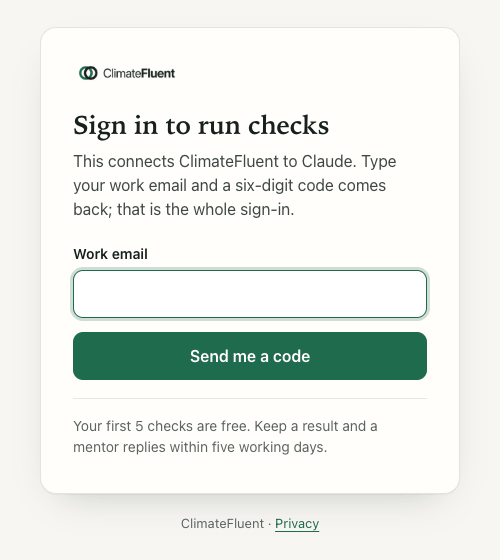
- Claude opens our sign-in page. Type your work email, the same one you use for the workspace, then the six-digit code we email you. The code works for ten minutes.
- In a chat, press +, choose Connectors and switch ClimateFluent on. When Claude asks to use a ClimateFluent tool, allow it.
Team and Enterprise
- An Owner goes to Organization settings, then Connectors, presses Add, then Custom (choosing Web if asked), pastes the address and presses Add.
- Each member opens Customize, then Connectors, finds ClimateFluent with the Custom label and presses Connect to sign in with their own work email.
Claude Code
Add the server from your terminal, then run /mcp inside Claude Code and follow the sign-in in your browser. Results come back as text.
claude mcp add --transport http climatefluent https://climatefluent.com/mcpFirst prompts
Each one names ClimateFluent so Claude picks the right tool.
Use ClimateFluent to list my EcoVadis projects.
Lists the companies and projects your email can open, with your role.Use ClimateFluent: what needs work in our EcoVadis project? Start with the high-impact themes.
Questions with no document, failing files with the reason, gates to sign, open actions, expiring documents.Use ClimateFluent to read our social audit certificate in the workspace and check it against the document rules. Add the fix to our plan.
Reads the file, checks it against rules R1 to R12, adds the action you agree.Use ClimateFluent: which documents would strengthen LAB3204? We are a large textile exporter in India.
Documents that usually serve, Indian examples, options left unticked in your export.Use ClimateFluent to turn these improvement areas into actions. Show me the mapping before adding anything.
Paste last cycle's improvement areas in your own words after the prompt.Use ClimateFluent: which EcoVadis documents does our factory need? We hold a signed environmental policy and a POSH annual report.
The quick check, no workspace needed: 21 evidence documents by theme and who usually holds each gap.What each tool does
Workspace tools appear when your sign-in email belongs to a workspace. The rest work for anyone signed in.
With a workspace
| Tool | In plain words |
|---|---|
| ecovadis_projects | Lists the companies and projects you can open, with your role and counts. Claude calls it first. |
| ecovadis_issues | What needs work in one project, by theme: questions with no document, files failing a check and why, gates to sign, open actions, previous documents expired or expiring within 90 days. |
| ecovadis_documents | The document register: each file, its kind, pages, and per question the page cited and the gate state. |
| ecovadis_read_document | Opens one workspace file and returns its text to Claude, 12,000 characters at a time. |
| ecovadis_document_check | Checks the facts of one document against ClimateFluent's document rules R1 to R12 and gives the fix for each rule it fails. |
| ecovadis_suggest_documents | For a question, or for every gap highest impact first: the documents that usually serve, Indian examples, matching policy templates, and what your export left unticked or undocumented. |
| ecovadis_rubric | The checklist for reading one document against up to six question codes at once. |
| ecovadis_review | Records Claude's reading of that document, with the page and a short quote per item, for you to confirm. |
| ecovadis_add_action | Adds an action you decide on to the plan: what to do, effort, owner and due date. |
| ecovadis_cap_import | Maps improvement areas you paste to question codes and priorities; shows the mapping first and adds the actions when you say so. |
| ecovadis_policy_template | A policy skeleton in our words for the company to adapt, approve, sign and date. |
For anyone signed in
| Tool | In plain words |
|---|---|
| ecovadis_readiness_check | The quick check: 21 evidence documents across the four themes, which you hold, and who in a company usually holds each gap. Shows as a card. |
| ecovadis_start | Starts an assessment for one company; paste the export text to bring in your question codes. |
| ecovadis_guideline | ClimateFluent's guideline for one question code: what it is about, which documents serve, Indian examples, and questions to ask about your document. |
| ecovadis_record_document | Records the facts of a document you shared in the chat and runs the code checks: validity, company name, format, size, page cited. |
| ecovadis_confirm_gates | Stores your Yes or No for the three gates, Relevant, Recent and Ready. |
| ecovadis_plan | The action plan by quadrant of impact and effort, and the questions with no document yet. |
| ecovadis_update_action | Changes an action's effort or owner; in a workspace project it can also take an action off the plan. |
How results land in your workspace
- Same email, same workspace. The sign-in in Claude acts as your workspace account, with the same role. Use the email you signed up with.
- Facts, gates and actions are saved to the project. A document recorded, gates confirmed, a review proposed, or an action added in the chat shows on the question page and in the plan straight away.
- A reading is a proposal. Claude's review of a document stores its quotes and pages; you answer the three gates yourself, in the chat or on the question page.
- Files stay in the workspace. Upload files on the question page. In the chat, Claude reads a workspace file through
ecovadis_read_document.
Disconnect
- For one chat: press +, choose Connectors and switch ClimateFluent off.
- Everywhere: go to Customize, then Connectors, and press Remove next to ClimateFluent (or use its three-dot menu). On Team and Enterprise, an Owner removes it under Organization settings, then Connectors.
- In Claude Code: run
claude mcp remove climatefluent.
Your workspace stays as it is; sign in on the web as before.
Your data
- ClimateFluent keeps your sign-in email, when you signed in and how many checks you ran, plus what you save to the workspace: document facts, gate answers, actions, and quotes of up to 160 characters with their page when Claude proposes a reading.
- Claude receives the tool results, including a workspace file's text when you ask it to read one. We send that text for that request only and keep no copy.
- Anthropic handles your conversation under its own policies.
Full detail: privacy policy, section 8 (ChatGPT and Claude) and section 9 (evidence workspace). To see, correct or delete your data, write to hello@climatefluent.com.
Sources
Claude steps checked against Anthropic's pages on 6 October 2026:
- Get started with custom connectors using remote MCP, Claude Help Center
- Add a connector that isn't in the directory, Claude documentation
- Use connectors to extend Claude's capabilities, Claude Help Center
- Connect Claude Code to tools via MCP, Claude Code documentation